On this page 11
The short version
A negative comment under your post is a conversation with an audience. The person who wrote it matters, but so does everyone who reads your reply later. A calm, specific answer usually does more for your brand than the comment did against it.
First, sort the comment: six kinds of negative comment
Before you type, decide what you're looking at. Each kind needs a different move:
- A fair complaint (late order, broken product, rude service): reply in public, then move the details to a DM. Never hide it.
- Unhappy but vague (“worst service ever”): reply in public with a question, so they can tell you what happened.
- Wrong information (a wrong price, a rumour): correct it once, politely, with the fact and where to check it.
- A price objection (“too expensive”): reply once with what the price includes. Don't discount in a comment.
- A troll or bait: answer once with facts, or not at all. A second reply is what they want.
- Abuse, spam or someone's personal data: hide or delete it, and restrict or block the account if it keeps happening.
Reply examples you can copy, by type
Swap the [brackets] for real details. A reply that names the actual problem reads as a person; a reply that could sit under any complaint reads as a template.
- A late or wrong order: “That's not the experience we want for you, [name], sorry. I've sent you a message so we can sort out your order today.” Or: “You're right to be annoyed, it should have reached you by [day]. Check your DMs, we're on it.”
- A fair complaint about quality: “Thanks for telling us, [name]. That [product] shouldn't arrive like that. We'll replace it, message us your order number in DM.” Or: “Fair point, and we've passed it to the team that makes it. Can we send you a new one?”
- “Too expensive”: “Totally fair to ask. The price includes [what it includes], which is why it costs more than [cheaper option]. Happy to explain more in DM.” Or: “We get that. If [smaller option] suits you better, it starts lower and covers the basics.”
- Wrong information in the comment: “Quick correction so nobody gets confused: [the fact]. You can see it on [where to check]. Thanks for asking.” Or: “We hear this one a lot! It's actually [the fact]. Our [page or post] has the details.”
- A vague “worst service ever”: “Sorry to read this, [name]. Can you tell us what happened? Message us and we'll look into it straight away.” Or: “We'd like to fix this. What went wrong? Our DMs are open.”
- A complaint about a staff member: “Thank you for telling us, [name]. That's not how we want anyone treated. Please message us the day and time so we can follow up properly.” (Don't name or defend the staff member in public.)
- Comparing you to a competitor: “Glad you've found something that works for you! If you ever want to try us again, [what you do differently].” Keep it short and never criticise the other business.
- A troll: one factual line, if any: “Thanks for the comment. For anyone reading, [the fact].” Then stop. If it turns abusive, hide it.
What not to write
- Defensive replies: “That's not true, we always deliver on time.” Even if you're right, the reader sees a business arguing with a customer.
- “Dear valued customer” and other lines that sound copied. Use their name and their problem.
- Arguing the facts back and forth in public. One correction is enough; the rest belongs in a private message.
- Asking for an order number, phone or address in the comments. Ask for it in DMs, never in public.
- The same sentence under every complaint. People scroll, notice, and read it as not caring.
How fast to reply
Our recommendation: the same day, and within a few hours during your working hours. An unanswered complaint stays in front of every new reader; an answered one shows them you responded.
If you can't fix it yet, reply anyway with a holding line (“Thanks, we're checking this and will message you today”) and then keep that promise.
Moving it to DMs without looking like you're hiding it
The public reply is for the readers; the private message is for the fix. Do both: a short public line that shows you care, then the details in a DM on Instagram or Messenger on Facebook, where you can ask for an order number safely.
When it's solved, close the loop in public if the person is happy for you to: “Glad we could sort this out, thanks for your patience, [name].” Readers who saw the complaint now see the ending too.
Hide, delete, restrict or block: Instagram settings
Instagram gives you five tools, from the gentlest to the strongest. All of these are in the app; menu names can move between updates, so if one isn't where we say, search for it in Settings.
- Hide one comment. You can hide comments on your own posts. A hidden comment stays visible only to you and the person who wrote it, and they aren't told. To bring one back, tap View hidden comments at the bottom of the comments.
- Hidden Words. Menu, then under How others can interact with you, tap Hidden words and add your own words, phrases, numbers or emoji. Separately, Hide unwanted comments (Menu, Comments) is on by default and hides comments with common offensive words, phrases or emoji.
- Restrict an account. Their new comments on your posts are visible only to them unless you approve them, they aren't told, and they can't tag or mention you. Good for a repeat critic you don't want to provoke by blocking.
- Limits. Temporarily hides comments and message requests from people who don't follow you or only recently followed you. Made for a pile-on after a post goes viral.
- Turn off comments on one post. Possible before or after posting. In Settings, under Comments, you can also limit who can comment across your account.
Facebook Page settings
- Hide vs delete one comment. Next to the comment, open its options and choose Hide comment. A hidden comment stays visible to the person who wrote it and their friends, and nobody else, so the writer usually doesn't notice. Deleting removes it for everyone, so keep that for abuse, spam and personal data.
- Block words. From your Page: Settings and privacy, Settings, Followers and public content, then Hide comments containing certain words from your Page. You can list up to 1,000 words, phrases or emoji in any language, and Facebook also catches common misspellings and variations.
- Profanity filter. On the same screen, switch on Hide posts and comments with profanity. Facebook decides what counts from the words people report most often.
- Block a profile from the Page. Settings and privacy, Settings, then Blocking in the left menu. A blocked profile can no longer see what you post on your Page, tag it or start a conversation with it.
Should you delete negative comments?
Not when they're fair. Deleting a real complaint tells the writer, and anyone who saw it, that you'd rather hide the problem than fix it, and some come back with a screenshot. Reply instead.
Delete, or hide, when it's abuse, hate, spam, a scam link, or someone's personal details like a phone number. On Facebook, hiding is often the better first step because the writer and their friends still see it, so it doesn't start a second argument.
Can you automate replies to negative comments?
Partly. A tool can safely handle thank-yous, simple questions it can answer from what you've written before, and a holding line during an outage. A person should always answer complaints, refund requests, anything about health, money or the law, and anything personal.
So the right question for any reply tool is not “can it answer complaints?” but “does it know when not to?”
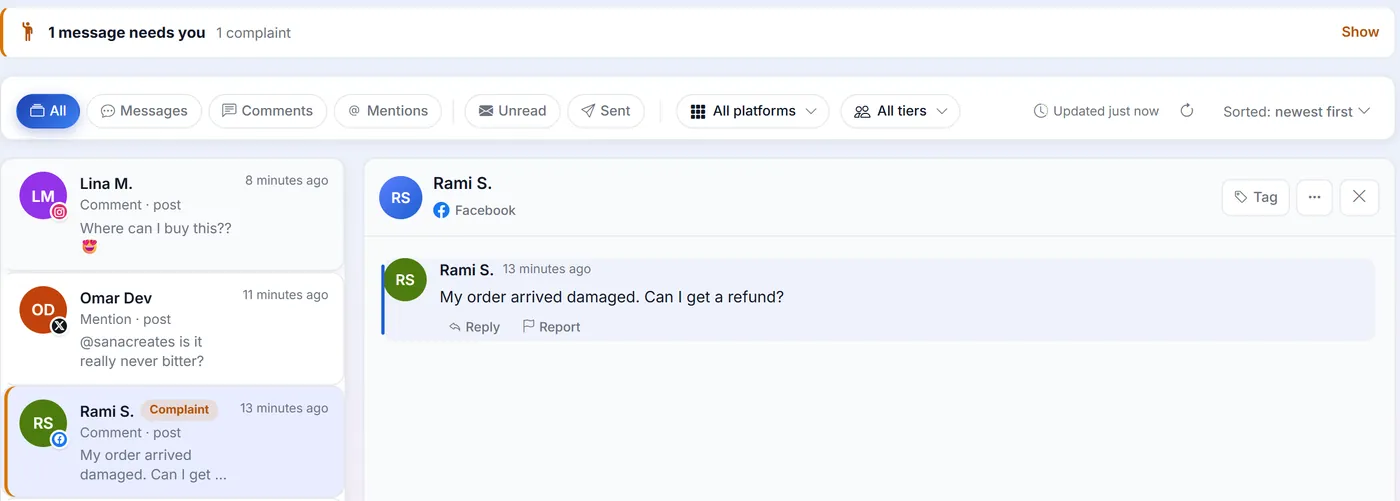
Disclosure: PersonaXpand is our product, and this is how it handles it. It replies to comments in your own voice on Instagram, Facebook, X, YouTube, Threads and LinkedIn Pages. When a comment is a clear complaint, with English words like refund, damaged, worst or scam (other languages aren't detected yet), it holds the reply for you to approve even if you've switched automatic replies on, and the inbox flags it under Needs you. Questions only you can answer, like a price or opening hours, are left for you rather than guessed. Its auto-like feature also skips complaints and put-downs, so an angry comment never gets a cheerful like from your account.
Turn complaints into fixes: a 15-minute monthly review
Once a month, scroll back through the negative comments and tag each one by topic: delivery, quality, price, staff, the app or website. Count them. If one topic keeps coming back, that's not a social media problem, it's a business one, and fixing it will cut next month's complaints more than any reply could.