Why comment replies matter more than they look
A reply doubles the comment count of the thread, keeps the conversation alive while the post is still being distributed, and tells the commenter, publicly, that there's a person here. For a personal brand that last part is the whole game: people comment to be seen by you, not by your tooling.
Which is why the standard automation, pasting “Thanks for your comment! 🙏” under everything, backfires. By the third identical reply, the audience knows, and knowing changes how they read everything else you post.
The three ways to automate, honestly ranked
- Canned templates (free, Meta's tools): fine for pure logistics (“link's in bio”), fatal for anything conversational. Use sparingly.
- Keyword triggers (flow tools): reply X when the comment contains Y. Predictable, and visibly robotic on any comment that isn't the keyword. Built for funnels, not conversation.
- Voice-trained AI: reads the actual comment, writes a fresh reply the way you would. The only approach where the hundredth reply is as varied as the first.
How to reply to comments on Instagram by hand
- In the app: tap the speech bubble under the post (or View all comments), tap Reply under the comment, and write your answer. Instagram tags the person for you, so they get a notification. Tap Post.
- On a computer: open the post on instagram.com, click Reply under the comment, type your answer and click Post.
- For a private answer: open the person's profile and send a DM instead. Business Suite's keyword automation can do this for you, as below.
Can Instagram auto-reply to comments by itself?
Not with a public reply. Instagram has no built-in setting that answers comments under your posts. The closest built-in option is in Meta Business Suite: under Inbox, then Automations, you can set keywords so that a comment containing one of them gets a private message (a DM) from you. The comment itself stays unanswered in public.
That works for “comment LINK and I'll send it” giveaways. It doesn't help with the comments that matter most, the questions and reactions where a visible reply shows everyone else reading the thread that you are there. Instagram also limits it to one private message per commenter, and it only matches the exact keywords you list.
How voice-trained comment replies work
Full disclosure: this is our product. PersonaXpand is an AI social media manager for personal brands: it writes posts in your own trained voice for all eight networks and auto-replies to comments, DMs and mentions, on one flat plan. For Instagram comments it reads each one in context, distinguishes questions from praise from FAQs, drafts a reply in your trained voice via the official API, and either holds it for your one-tap approval or sends routine ones autonomously. Sensitive comments get flagged to you instead of answered by guesswork. See how Instagram auto-reply works for the setup and the limits.
How to auto-reply to Instagram comments, step by step
With PersonaXpand the setup takes a few minutes. You need an Instagram professional account (Business or Creator), which you can switch to in Instagram's settings.
- 1. Connect Instagram through Instagram's own login. No password is shared, and you can remove access from Instagram at any time.
- 2. Let PersonaXpand learn your voice from your own posts and replies, so drafts sound like you and not like a template.
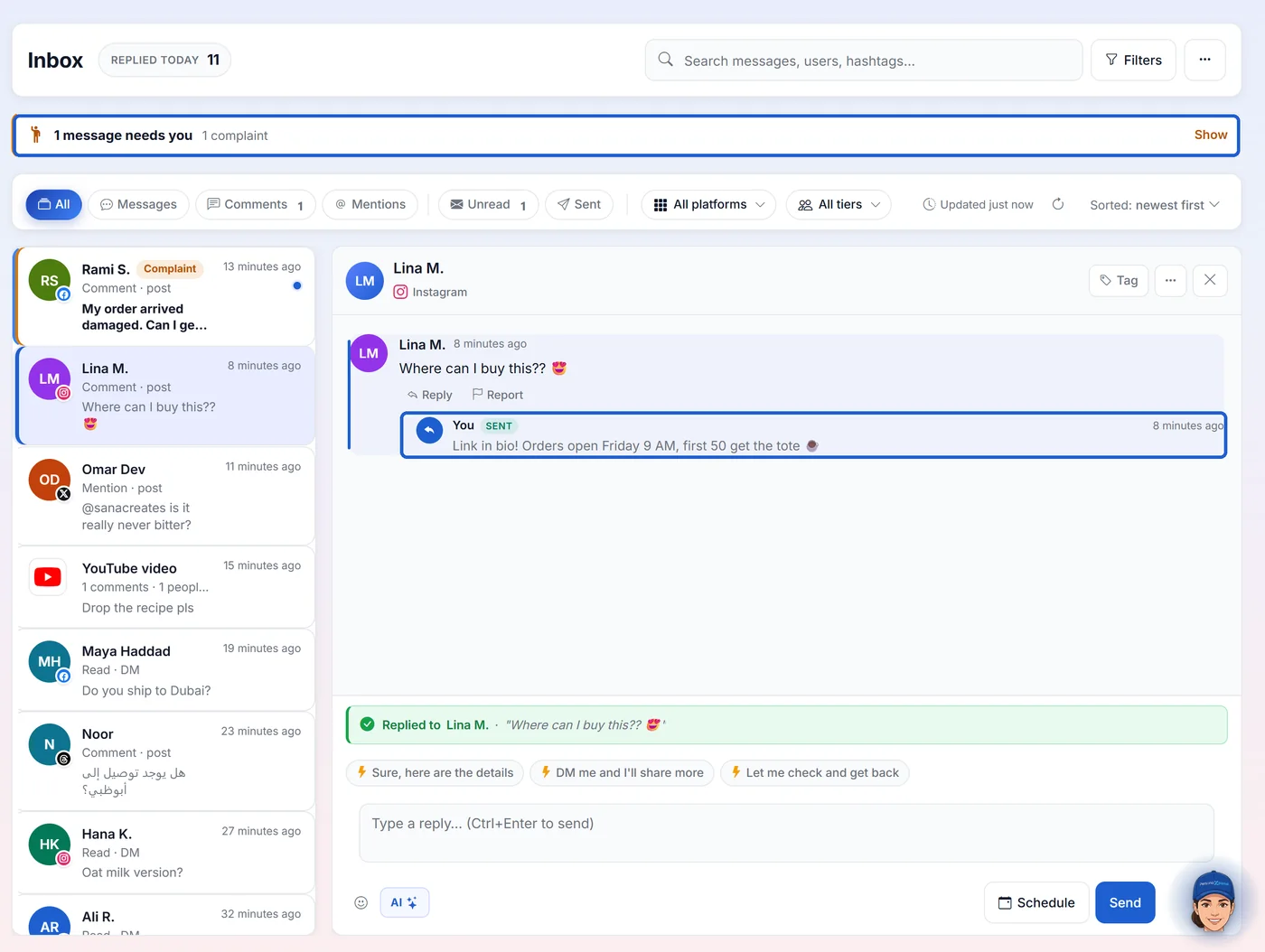
- 3. Turn on comment replies for Instagram and keep approval on. Each draft waits in your inbox for a one-tap approve or edit.
- 4. Add your own rules: what to say about bookings, words never to use, topics to always leave for you.
Setup that keeps you in control
- Start in approval mode: every drafted reply waits in your inbox for a tap. You're editing the AI's understanding of your voice with every correction.
- Promote routine categories (thanks, simple FAQs) to autonomous once drafts stop needing edits.
- Keep sensitive topics flagged-only, permanently. Some replies should never be automatic, and a tool that disagrees is a tool to avoid.
- Watch the first week's threads: replies that spark follow-up conversation are the success metric, not reply count.
Already use Claude? You can work through your comments from a chat too: add PersonaXpand to Claude and ask it to draft replies. It shows you each one before sending.